

Pricing Guide
Google Ads AI Agent Pricing: Seats, Account Limits, and Total Cost
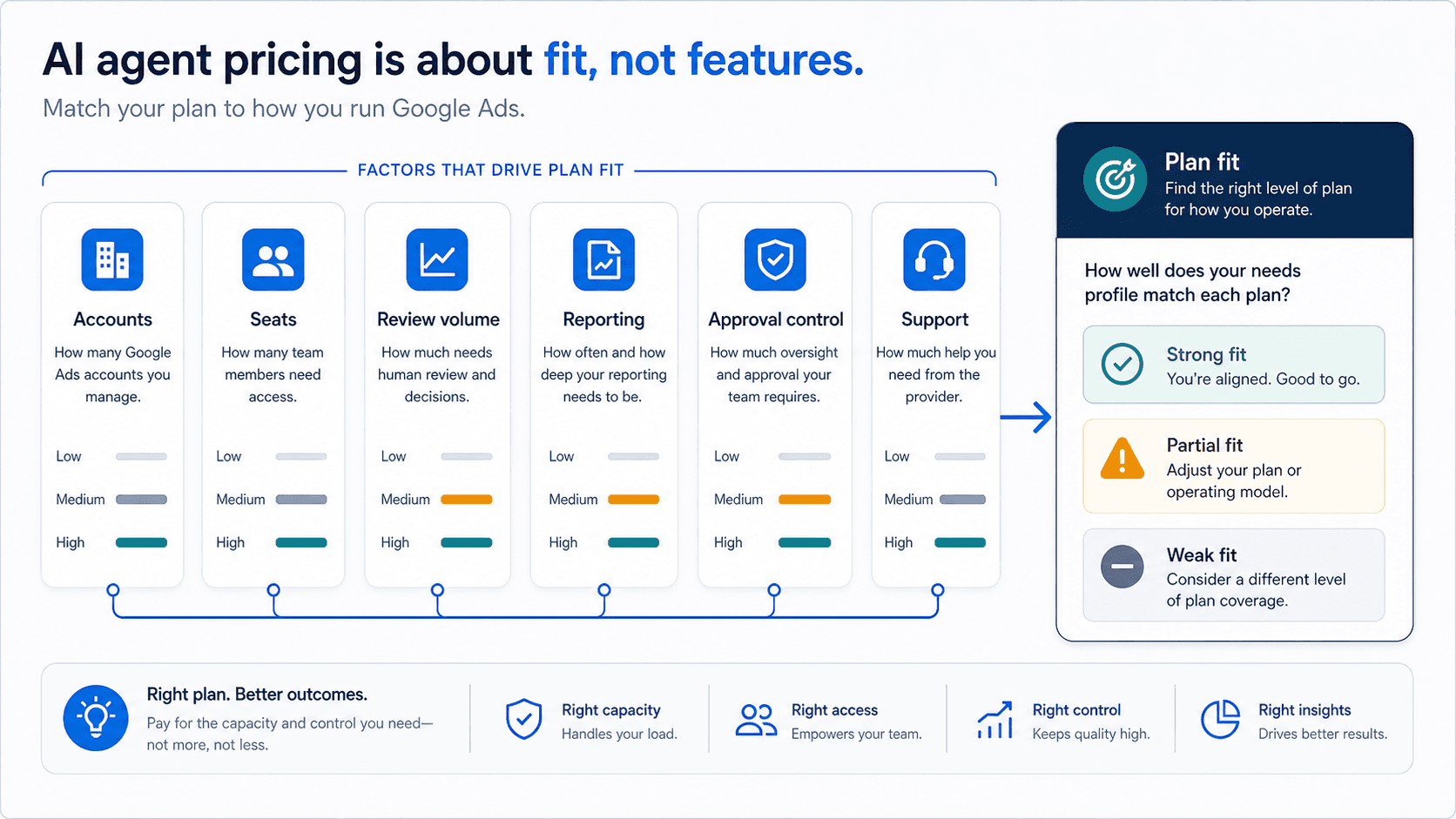
Price only matters after the plan covers the real Google Ads work: accounts, users, daily analysis volume, reports, and approvals.
Compare Google Ads AI-agent pricing against the weekly labor it removes or preserves, with seats, account limits, usage caps, trials, and approvals all in view.
Key takeaway
Google Ads AI-agent pricing only looks simple when teams compare the monthly sticker price. The real cost sits in seat model, connected-account capacity, message caps, model access, trial rules, and how much manual PPC work still remains after rollout.
Parallel AI is the AI agent platform for Google Ads work. Agencies and in-house teams hand off research, reporting, and optimization on connected accounts, and every account change the agent drafts waits for a person to approve it. Most tools in this category stop at recommendations. Parallel finishes the work in docs, spreadsheets, and reports a client or a lead can act on.
The useful pricing question is whether the plan matches the way your team actually manages Google Ads: how many accounts stay active, how many teammates touch the review, how often reports or summaries have to ship, and whether a daily cap or seat minimum pushes work back into manual cleanup.
This pricing guide uses current public plan copy plus billing and entitlement references, then applies a total-cost model that includes software spend, remaining labor, and team review time.
- Plan names and CTA language come from the live marketing configuration.
- Seat minimums, trial rules, and entitlement caps are treated as purchasing constraints, not fine print.
- Model labor recovery and rework reduction before comparing vendors on price alone.
- A strong fit combines commercial judgment, human review, and reporting teams can share rather than only surfacing automation ideas.
Monday morning procurement often begins with the wrong spreadsheet. One column says $60 per month. Another says $75 per seat per month. The team debates which number looks smaller while the real cost, the analyst hour still spent rewriting the weekly account review on Friday, is not even on the page. That missing hour is the comparison that matters.
DEFINITION
Total cost
Software spend plus the labor, rework, approvals, and coordination the team still pays after the plan is live.
Marketing pricing config
That is why six inputs belong ahead of any monthly number. Seat model tells you whether the plan matches solo use, shared workspaces, or seat-based collaboration. Account capacity tells you whether the real operating set fits. Usage limits, including messages, runs, exports, and doc or sheet generation caps, tell you whether the team can actually push its weekly review volume through the plan.
Model access matters too, but only inside the rest of the plan. Reporting and output depth matter because a tool that only answers questions is not priced against a tool that can support pacing sheets, account-review docs, and shareable summaries. Residual manual work matters most of all. If analysts still rebuild outputs by hand every week, the apparent savings disappear fast.
The useful price tag is the one attached to the hour you are still paying for.
With the inputs defined, the table becomes useful because it can be read against a real workload rather than against abstract thrift.
The table is not a leaderboard. It is a workload map. Individual Pro and Individual Max are priced for compact, solo operating shapes. Team and Agency are priced for shared-review environments where account scope and collaboration matter more than a low solo sticker. Enterprise is not a bigger self-serve tier. It is a negotiated operating shape.
The mistake is to compare the rows without first deciding what week the row has to carry. A solo specialist with a compact account set and an agency pod with recurring client reviews are not buying the same thing, even if both say they want an AI agent for Google Ads.
A plan row is only meaningful once it is matched to a real week of work.
| Plan | Price | Capacity | Best fit |
|---|---|---|---|
| Individual Pro | $60/mo | 2 accounts, 30 messages/day | Solo specialist with a compact account set |
| Individual Max | $200/mo | 10 accounts, 100 messages/day | Power user handling a larger portfolio |
| Team | $75/seat/mo | 20 shared accounts, 40 messages/day per seat | In-house team with shared workflow needs |
| Agency | $150/seat/mo | 50 shared accounts, 100 messages/day per seat | Agency pods with multi-person review cycles |
| Enterprise | Custom | Negotiated limits and controls | Large organizations with contract-led requirements |
Google documentation·Google Ads Help
Google's guide to AI Mode and AI Max ads
Use Google's official overview of broad match, Smart Bidding, and responsive search ads as the baseline for any native Search AI claim in these guides.
Open official guideThat is why pricing caveats are not housekeeping. They are operating facts. Only individual plans are trial-eligible. Team and Agency tiers do not have a public trial. Trial eligibility can still be blocked by prior billing or trial history, and trial safeguards can reduce some limits compared with paid-tier allowances. A team that ignores those details is not reading price. It is reading a partial scenario.
Seat minimums matter for the same reason. Team and Agency plans can enforce them at checkout, which changes the first-month cost immediately. Enterprise terms are negotiated, so no team should translate custom contracting into vague unlimited-use language. In pricing, the caveat is often the decision.
If the caveat changes who can buy or how much work fits, it belongs in the first read, not the footnote read.
Because the sticker price cannot answer the operating question on its own, plan fit has to be tested on the same workload the team will really run.
01
Days 1-3: capture the current workflow cost
Measure analyst hours spent on diagnosis, planning, and reporting output before you test anything new.
02
Days 4-10: run one recurring workflow on the candidate plan
Use the same account set and track where plan limits, summary quality, or collaboration overhead create friction.
03
Days 11-14: decide on throughput and quality
Compare recovered labor value against software and coordination cost, then decide on total operating economics.
Price the live workflow for two weeks before you price the subscription for twelve months.
From there, fair vendor comparison means forcing the same questions onto every plan. Are limits per person, per workspace, or per connected account. What does the base tier exclude, especially around advanced models, exports, or collaboration features. Does the workflow end at a chat answer or continue into account-review docs, pacing sheets, and client or executive summaries.
Overage rules and upgrade triggers belong in that same comparison because they are part of total cost, not minor legal footnotes. Two plans can have similar monthly numbers and radically different operating economics once account load, review cadence, and reporting obligations hit them.
Equal prices do not mean equal weeks.
That is why pricing checklists have to follow team shape instead of pretending every buyer is just shopping for features.
Agencies need shared account capacity, seat fit, and output quality strong enough to reduce post-edit time on client-facing work. In-house teams need shared context, approval controls, and outputs that move into internal planning or reporting without another tool layer. Solo consultants need to know whether the lowest paid tier already clears account load and weekly workflow volume without forcing an early upgrade.
Those are different questions because they are different labor problems. A plan can be cheap for one team shape and structurally expensive for another.
Team shape is part of price because team shape determines which hour the plan can actually remove.
| Team shape | Questions to answer before buying |
|---|---|
| Agencies | Does shared account capacity cover active clients, do seat minimums fit current staffing, and are outputs client-ready enough to reduce post-edit time? |
| In-house teams | Does the plan cover all active business units, preserve approval controls, and generate exec updates, channel summaries, or approval notes without adding a second tool layer? |
| Solo consultants | Does the lowest paid tier already clear account load and weekly workflow volume, or will message and account caps force an early upgrade? |
A pricing page becomes useful only when it tells a buyer how the plan changes the weekly job. Software cost matters, but it is rarely the real driver of ROI on its own. What usually decides the outcome is whether the plan clears the coordination bottleneck, preserves account-review output quality, and reduces the manual handoffs that still happen after the software is purchased.
That is why mature teams do not ask only whether a plan is affordable. They ask whether it supports the exact operating shape they run now: how many accounts stay active at once, how many teammates touch the review, how often client summaries or executive updates have to ship, and how often a daily cap or seat minimum would push work back into spreadsheets, chat threads, or offline cleanup.
The labor budget often survives a cheap license untouched.
Once labor is in view, scenario planning becomes more honest than one average buyer persona.
The solo specialist, the in-house team, and the agency pod all meet the same pricing table with different constraints. One cares about individual headroom. Another cares about shared review. Another cares about client-ready output and delivery drift. The sticker price stops telling the truth the moment those constraints diverge.
Scenario planning makes that divergence visible before the purchase, which is exactly when it is still cheap to learn.
A scenario table is really a labor map disguised as pricing.
| Scenario | What usually matters most | Common buying error |
|---|---|---|
| Solo specialist | Account capacity, daily usage headroom, and whether the tool removes reporting or summary-writing overhead. | Buying for model access alone and discovering the workflow still needs too much manual cleanup. |
| In-house team | Shared review and reporting help, review controls, and whether outputs can move cleanly into internal reporting or planning cadences. | Underestimating how quickly a solo-plan mindset breaks once more than one teammate touches the review process. |
| Agency pod | Shared account scope, seat economics, client-ready output quality, and whether the workflow reduces delivery drift across account managers. | Comparing price per seat without modeling how much review and post-edit time still remains after rollout. |
That labor map becomes sharper when the team extends the view beyond the first invoice.
License cost is the obvious input, but residual manual work, manager review load, and rollout overhead often decide the real outcome. Buyers miss them because demo flow is smoother than production flow. The first draft looks fast, the first answer looks polished, and the team forgets to cost the hours that remain after the software is live.
A 30- to 90-day model corrects that bias. It shows whether the plan removes the expensive hour or merely changes where that hour gets spent.
If the same hour keeps coming back, the plan has not earned its price yet.
| Cost input | What to count | Why buyers miss it |
|---|---|---|
| License cost | Seat or workspace fees, plan upgrades, and any expected overage trigger during the pilot window. | Teams compare only the first monthly number and ignore what happens once more teammates or accounts join the review process. |
| Residual manual work | Time still spent rewriting weekly summaries, rechecking recommendations, or moving work into docs and sheets. | A tool can look efficient in demo mode while leaving the recurring weekly job mostly unchanged. |
| Manager review load | Extra approval or quality review time created by the new workflow, especially in agencies or in-house pods with signoff chains. | Software savings disappear fast when review moves upstream to a more expensive role. |
| Rollout overhead | Template setup, onboarding time, workflow documentation, and the cost of running the pilot itself. | Buyers undercount adoption work and then blame the plan when the first month looks expensive. |
By procurement time, the question is no longer which plan sounds strongest. It is which plan still fits once the workflow is stated plainly.
That is the final reason pricing must be read against workflow. Solo specialists, in-house growth pods, and agency pods each hit different constraints first. Procurement errors usually come from treating all three like the same buying motion and then being surprised when shared approvals, client output, or account load change the economics.
For teams choosing Parallel, the plan question is whether the agent can work from the connected Google Ads account, finish the weekly work in docs, spreadsheets, and reports the team actually uses, and keep drafted account changes waiting for a person to approve. That is the workload the price is buying.
The right plan changes when the day-to-day changes because the price is really attached to the workflow, not the feature list.
| Team situation | What matters most | Wrong decision if ignored |
|---|---|---|
| Solo specialist running a compact account set | Low-friction account capacity, enough daily volume, and no forced jump to collaboration-heavy tiers. | Buying for advanced-model access before weekly workflow volume actually justifies it. |
| In-house growth pod with shared approvals | Shared context, review-ready outputs, and approval controls that match how recommendations move through the business. | Choosing a low sticker price that pushes planning and reporting back into manual docs and chat threads. |
| Agency pod with recurring client reviews | Shared account capacity, seat economics, and output quality that lowers post-edit time on client-facing work. | Ignoring seat minimums, shared-account limits, or collaboration overhead until rollout is already underway. |
Before a team signs or publishes anything, the live checkout or sales-led quote path has to match the public plan language being cited. Limits need to be written in the procurement summary the way they are actually enforced: per seat, per workspace, per day, or per connected account. Included outputs, models, and collaboration features have to be stated as included or excluded, not inferred from marketing shorthand.
The same summary should record what the pilot must prove in 14 to 30 days so the team does not mistake a valid trial for a permanent operating fit. Verification is what turns public pricing into a decision instead of a narrative.
If the buying summary still depends on unstated limits, the team does not yet have a real price.
The recurring mistakes are consistent. Teams optimize for the lowest sticker price instead of the lowest total operating cost. They ignore account and usage limits until rollout is already underway. They buy advanced plans before testing whether the workflow actually removes recurring analyst work. Or they compare features without defining what the system needs to do every week.
None of those are really pricing mistakes in isolation. They are failures to account for labor honestly. Once the team counts the expensive hour it wants back, the comparison sharpens quickly and much of the marketing noise falls away.
On Monday morning, choose one recurring Google Ads review, price the analyst and reviewer hours it still consumes, and compare every plan against that hour before you compare plan against plan.
Google documentation
Official Google Ads reference for average daily budgets, spending limits, served cost, and billed cost.
Official Google Ads reference for budget and bid setup before teams compare software cost with media-spend decisions.
Think with Google's current measurement and budget-control framing, useful for pricing, efficiency, and rollout discussions.
Additional documentation
Practical review of which Google Ads AI features are safe starting points and which ones still require tighter human oversight.
- Blog homeBrowse every published Google Ads guide from one editorial index.
- Google Ads AI agent: complete guideThe pillar guide covers the category definition, the adoption model, and where the agent fits real Google Ads work.
- ResourcesMove between the definition page, pricing, product walkthrough, and trust pages.
- About Parallel AISee the company mission, editorial standards, and operating principles behind the product.
- SecurityReview the public data-handling, account-connectivity, and approval-control framing used throughout the published guides.
- Best AI Agents for Google Ads: How to Evaluate the ShortlistUseful when buyers need a category-aware framework for evaluating Google Ads AI-agent options by review quality, reporting, and approval fit.
- Google Ads AI Agent vs Manual Management: ROI Framework for PPC TeamsFor deciding whether an AI-assisted Google Ads workflow will fund the reviews manual management keeps deferring.
- Google Ads Copilot Alternatives: Native AI, PPC Platforms, Scripts, and AgentsFor buyers searching copilot alternatives who need the right category before comparing brands.