

Alternatives Guide
Google Ads Copilot Alternatives: Native AI, PPC Platforms, Scripts, and Agents
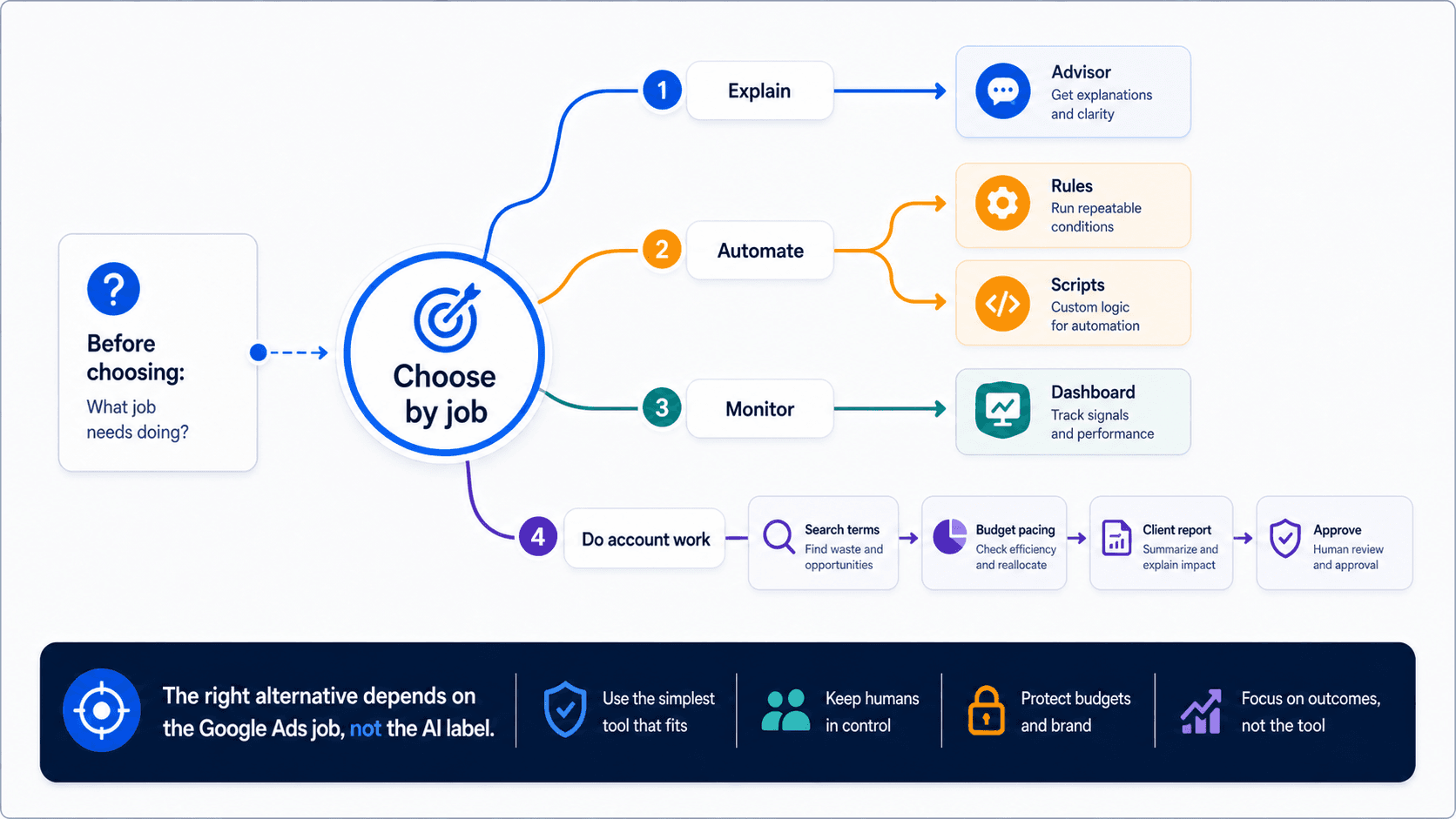
Compare categories first. A dashboard, a rule engine, a PPC platform, Google product assistance, and an AI agent do not solve the same problem.
The best Google Ads copilot alternative is the category that removes manual work, not another chat layer. Compare native AI, platforms, scripts, and agents by job.
Key takeaway
Monday morning, the paid media lead searches for a Google Ads copilot alternative because Recommendations, search terms, and the client deck still need three different tools and two hours of copy-paste. The real question is not which chat product wins. It is which recurring work should stop being manual.
Google product assistance helps inside the platform through Smart Bidding, AI Max, and Recommendations. PPC platforms help with rules and alerts. Scripts handle stable automation. Dashboards help with visibility. An AI agent helps when connected account context must become a report, sheet, or reviewed next step. Parallel AI belongs in the agent category: the AI agent platform for Google Ads work on connected accounts, with finished docs, sheets, and reports, and drafted changes waiting for human approval.
Checked against current product, pricing, trust, and official Google materials so the explanation stays tied to the live product and current Google Ads context.
- Categories were separated before any brand comparison: native Google AI, PPC platforms, scripts, dashboards, and AI agents.
- Each category was mapped to the manual work it can remove and the Google Ads surface it actually touches.
- Parallel claims stay limited to connected account review, finished reports, and drafted changes held for human approval.
Copilot is buyer shorthand for AI-assisted account work. The useful step is naming which manual loop you want gone before picking a category.
DEFINITION
Google Ads copilot (buyer shorthand)
A label teams use when they want faster account review, recommendations, reporting, or next-step preparation. It is not a precise Google Ads product category. Google's own AI surfaces include Smart Bidding, AI Max for Search, Recommendations, and in-product reporting controls documented in Google Ads Help.
Google Ads Help: AI-powered Search; Recommendations
Many copilot searches hide a manual-work problem: the team still exports search terms, rebuilds the weekly summary, and chases approval on budget changes. A better copilot chat does not fix that if the output still stops at a transcript.
Start by listing the manual steps in one recurring job. Then ask which category removes the most steps with acceptable risk.
Agency teams often discover the expensive steps sit in client packaging, not in-platform tuning. In-house teams often discover cross-campaign narrative is the gap. Same search query, different manual loop.
Name the manual loop first. The category choice gets easier immediately.
Once the manual loop is visible, map it to Google Ads surfaces. That keeps the comparison honest.
If most manual time sits in the summary row, another in-platform assistant is the wrong first move. If most time sits in auction-time tuning, native Google AI should lead.
Illustrative portfolio: a team spending six hours weekly on client summaries and ninety minutes on bid strategy review should shortlist reporting and agent categories before another Smart Bidding dashboard. Numbers are illustrative. The allocation logic is not.
| Manual step | Google Ads surface | Category that helps |
|---|---|---|
| Checking pacing and bid strategy movement | Budget reports, Smart Bidding settings, Change history | Native Google AI, PPC platform alerts, or a connected AI agent |
| Grouping wasted search terms | Search terms report, negative keyword lists | Scripts, PPC platforms, or an AI agent that drafts grouped negatives for review |
| Writing the client or leadership summary | Campaign reports, conversion actions, Recommendations context | AI agent, reporting connector, or manual docs |
| Approving material changes | Recommendations, Editor, in-product change controls | Any stack that keeps budget, bid, and structure changes visible before they ship |
The category should remove steps, not add another login.
With the manual audit done, the decision table becomes a routing guide rather than a vendor list.
PPC platforms such as Optmyzr-class tools remain strong when the team wants managed automation depth and repeatable account processes. They are weaker when the missing piece is flexible AI-led docs and summaries from live account context.
Dashboards answer visibility questions. They rarely remove the narrative work that copilot searches actually describe.
Scripts excel when the rule is stable: export search terms weekly, pause ads below a threshold, or alert on budget pace. They fail when the job requires explaining why CPA moved to a client who will ask follow-up questions in the same thread.
Native Google assistance belongs in the stack when auction-time matching, Smart Bidding, AI Max, and Recommendations are the actual bottleneck. It does not replace the doc where your team writes what happened and what happens next.
| Primary bottleneck | Best first category |
|---|---|
| Campaign matching, bidding, or asset adaptation | Google product assistance |
| Stable alerts or exports | Scripts, rules, or PPC platform automation |
| Reports, sheets, account review, and next-step planning | AI agent such as Parallel |
Pick the category that deletes manual steps you can measure.
01
Pick one recurring Google Ads job
Use a real weekly job such as search-term review, budget pacing, Recommendations review, PMax reporting, or a client update.
02
Run the job through two categories
Compare the current stack against one alternative category, not five tools at once.
03
Choose by output quality
Measure whether the output is clear, specific, reviewable, and useful without major manual cleanup.
One recurring job tells the truth faster than a feature matrix.
Most failed copilot pilots share the same failure mode: the team bought a category that matched the demo, not the manual loop.
Mistake one is swapping chat products without changing the report, brief, or recommendation. If Friday's client update still starts from a blank doc, the copilot did not remove manual work. It added another tab.
Mistake two is treating dashboards as reporting. Charts show movement. They rarely answer why the client should care or what you will do before next week's call.
Mistake three is optimizing for suggestion volume. More Recommendations alerts without prioritization and Change history context just move the sorting work to the account lead.
The fix is boring and effective: pick one recurring job, measure manual minutes before and after, and reject any category that only improves the demo.
Manual minutes removed is the scoreboard.
Parallel AI is the AI agent platform for Google Ads work. It connects to the account, carries context across search terms, budgets, Recommendations, Performance Max signals, and Change history, then finishes in docs, spreadsheets, and reports someone can review. Drafted account changes wait for human approval.
Parallel fits when the copilot search is really about reporting, planning, and reviewed next steps outside a single Google Ads panel. It does not replace Smart Bidding, AI Max, Recommendations, or in-platform campaign delivery. It replaces the manual rebuild between those surfaces and the client or leadership update.
Honest boundary: Parallel is not a dashboard and not a rule engine. If the team only needs charts, start elsewhere. If the team needs the account story written and approvable, test Parallel on one weekly job.
See Google Ads automation vs AI agents and best Google Ads AI agents. On Monday morning, list every manual step in your weekly account review, mark which category could remove each step, and pilot the category that deletes the most time with acceptable risk.
If the pilot output still needs a full rewrite before client or leadership review, the category did not remove the manual work. It moved it.
Google documentation
Google's current documentation for AI Mode and AI Max built on broad match, Smart Bidding, and responsive search ads.
Official Smart Bidding reference for Google's automated bid optimization systems.
Official overview of AI Max for Search campaigns, including matching, creative, reporting, and controls.
Official reference for Google Ads Recommendations and how they use account history, campaign settings, and trends.
Official reporting reference for Report editor, predefined reports, saved reports, and manager-account reporting.
Official reference for using the search terms report to review which searches triggered ads and identify keyword or negative keyword updates.
Additional documentation
Practical review of which Google Ads AI features are safe starting points and which ones still require tighter human oversight.
Workflow-oriented comparison of native Google Ads editing and rule tooling versus a team-scale automation layer.
Shows how mature PPC teams layer multi-condition automation, alerts, and review steps beyond simple native rules.
About Parallel
Current security, data-handling, and connectivity framing.
Company mission and editorial review context behind the published guides.
- Blog homeBrowse every published Google Ads guide from one editorial index.
- Google Ads AI agent: complete guideThe pillar guide covers the category definition, the adoption model, and where the agent fits real Google Ads work.
- ResourcesMove between the definition page, pricing, product walkthrough, and trust pages.
- About Parallel AISee the company mission, editorial standards, and operating principles behind the product.
- SecurityReview the public data-handling, account-connectivity, and approval-control framing used throughout the published guides.
- Ask Advisor and AI Agents After GML 2026: Native Google Help vs Team ReviewFor teams deciding what belongs in Ask Advisor, native Google AI, or agent-led account review after GML 2026.
- Best AI Agents for Google Ads: How to Evaluate the ShortlistUseful when buyers need a category-aware framework for evaluating Google Ads AI-agent options by review quality, reporting, and approval fit.
- Google Ads Automation vs AI Agents: Rules, Native AI, and Agent-Led ReviewHelpful when a team needs to sort Google Ads work into threshold-based automation, auction-time optimization, or account-level diagnosis with approval.